Remove Liquidity
Withdrawing liquidity from SKNK Hub involves a smart-settlement process. Depending on active gaming volume, your withdrawal may move through a Pending State to ensure all active tickets are covered.
⏳ The Withdrawal Flow
When you initiate a withdrawal, the protocol checks for active tickets. Here is the lifecycle of your exit:
Burn LP Tokens
Reserve portion sent to wallet
Wait for tickets to settle/cancel
Claim remaining funds
Step-by-Step Guide
Step 1: Request Withdrawal
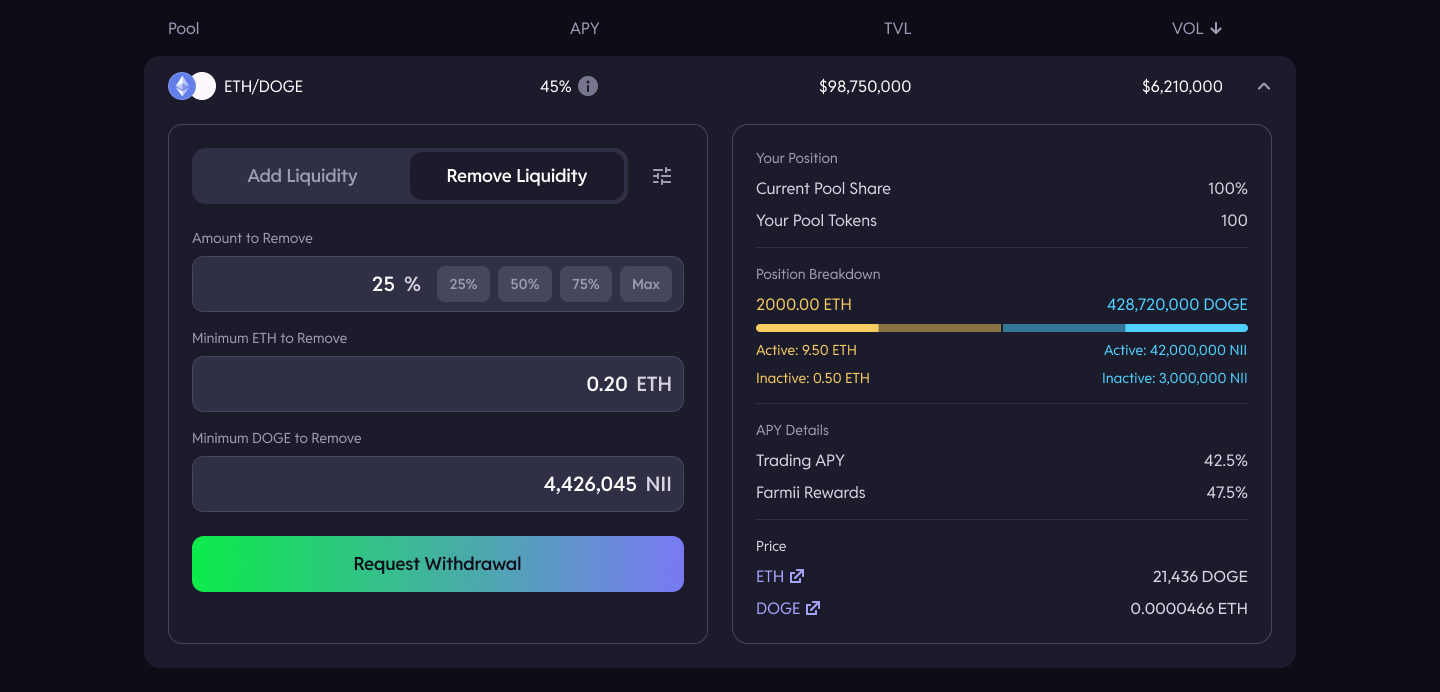
Navigate to My Positions, review the Fees Earned, then head to the pool, click Remove Liquidity, and select the amount you wish to remove.
Step 2: Instant Reserve Payout
Upon clicking "Request withdrawal" and signing the transaction, the Hub immediately calculates the available Reserves.
- What you get now: Your pro-rata share of all idle capital.
- What stays behind: Capital currently "Locked" against active game tickets.
Step 3: The Pending State
If there are active tickets, your withdrawal enters a Pending State.
The remaining funds stay locked until the associated tickets are either Settled (game finished) or Cancelled. This ensures the integrity of the betting pool.
Step 4: Finalize & Claim
Once the tickets are cleared, the "Finalize" button will become active under My Withdrawals.
- Finalize Transaction: This can be triggered by you (or technically anyone) to push the remaining funds to your wallet.
- Result: You receive the remaining balance + accumulated fees.
Withdrawal Summary
| Component | Status | Action Required |
|---|---|---|
| Reserves | Instant | None (Auto-sent) |
| Active Tickets | Pending | Wait for Game Settlement |
| Finalization | Manual | Click Finalize in Hub under My Withdrawals |
Because the "Finalize" function can be called by anyone, you may sometimes find that your funds have already been moved to your wallet by other users!
Smart Contracts
Ensure spending allowances are set on LP tokens prior to calling router functions.
Both withdrawal stages can be triggered on the SLPRouter contract. startRemoveLiquidity() will burn the corresponding LP tokens for the pool. In order to finalise the withdrawal, a withdrawal nonce will be required. This is emitted in the SLPPair.startBurn() call within the first withdrawal step.
function startRemoveLiquidity(
    address tokenA,
    address tokenB,
    uint256 liquidity,
    uint256 amountAMin,
    uint256 amountBMin,
    address to,
    uint256 deadline
)
public
returns (uint256 amountA, uint256 amountB);


function finaliseRemoveLiquidity(
    address tokenA,
    address tokenB,
    uint32 nonce
) external;
event BurnStarted(
    address indexed sender,
    uint256 amount0,
    uint256 amount1,
    address indexed to,
    uint256 indexed withdrawNonce
);